Messages : SMS & Private Chat
- 4.0
- Rating
- 1.00M
- Installs
- Free
- Price

 Analysis by App-foxy
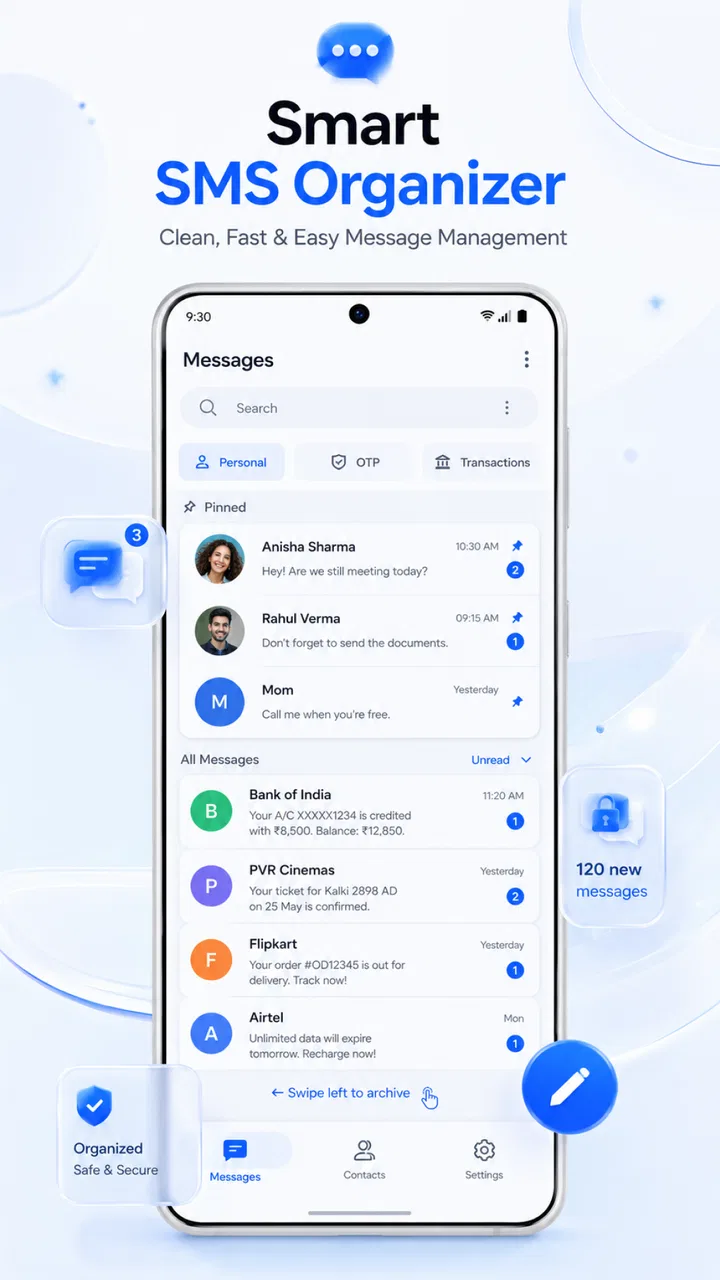
I approached Messages: SMS & Private Chat as a practical replacement for the standard texting tool on an Android phone, not as a social network or a full collaboration platform. Its purpose is straightforward: handle ordinary SMS conversations and provide a chat-style place for day-to-day messaging. That narrow focus is its biggest appeal. If you mainly need a cleaner way to send texts, keep conversations organized, and avoid installing a large social app just to contact people, it makes sense to test.
My overall impression is positive but measured. The app feels aimed at people who want messaging to remain familiar rather than become another account-based service. At the same time, “private chat” can sound more protective than a normal texting application necessarily is, so I would not choose it solely because of that wording. I would choose it for its direct communication workflow, then check how well it fits my contacts, notification habits, and expectations around modern messaging.
How the app feels in everyday use
The first thing I noticed is how quickly the app’s role becomes clear. It belongs to the communication category and stays close to the basic actions most people expect: opening a conversation, reading recent messages, writing a reply, and starting a new text. That simplicity is useful when I am sending a quick update rather than trying to manage a large online identity.
You May Also Like

 Blood Strike: 2.5 Anniversary
Blood Strike’s Loadouts Turn Every Drop Into a Tactical Gamble
A close look at Blood Strike’s custom loadouts: how fast access to signature weapons reshapes its battle royale rhythm, rewards preparation, and narrows the gap between fights.

 Pandora - Music & Podcasts
Pandora’s Music Is Easy to Start, but Harder to Recover
Pandora’s strength is its low-effort path from a seed to a station. Its weak spot is how much confidence it asks you to place in connection, setup, and quiet recovery.

 8 Ball Pool
 Is Built on Rivalries, Rematches, and Routine
A close look at the rivalries, rematches, shared routines, and unanswered safety questions that turn a quick pool match into a persistent mobile community.

 Samsung Music
’s Quiet Strength Is Playing What You Already Own
Its reach comes less from spectacle than from dependable access to a personal library. That simplicity is both the app’s strongest retention engine and its ceiling.

 AccuWeather: Weather Radar
AccuWeather Review: A Quick, Clear Forecast for Everyday Decisions
For everyday plans, the best forecast is the one you can understand quickly. AccuWeather makes rain timing, radar, and local conditions easy to act on, with a few trade-offs.

 Hill Climb Racing
Why Hill Climb Racing Still Turns Crashes Into One More Run
A tiny car, a bumpy hill and one more upgrade: Hill Climb Racing keeps resurfacing because its simple chaos makes every near-miss feel personal.
More From Our News Desk



A realistic example is a busy afternoon when I need to tell a family member that I will arrive later, confirm an appointment, and answer a short message from a delivery driver. In that situation, I do not need channels, public profiles, story feeds, or a separate community. I need a conversation list that lets me find the right person and send a clear reply without distraction. This app is well suited to that kind of routine.
I also see value for someone moving from an older messaging interface to a more contemporary layout. The store summary presents it as a simple and secure text messaging and chat messenger app, and that description matches the general direction: it tries to make ordinary SMS feel like a dedicated messaging experience rather than an overlooked system function.
Still, the experience depends heavily on what I expect from the word “chat.” SMS is not the same as an internet messenger. A person who wants rich group tools, synchronized conversations across several devices, desktop access, voice calls, media-heavy conversations, or a large network of active contacts may find a specialist messenger more suitable. This app is more convincing when used as a focused texting utility than when treated as a universal replacement for every communication service.
The current version and what it suggests
The current release is version 2.4.6, while the app first appeared on July 28, 2023. That combination tells me the product has had time to move beyond an initial launch build, but I would still judge it by what is available now rather than assume a long history of development. A version number by itself does not prove that every rough edge has been solved.
For an existing user, the important question is whether updates preserve the basic messaging routine. In a texting app, stability matters more than novelty. I would rather see dependable conversation loading, predictable notifications, accurate contact selection, and safe handling of drafts than a collection of flashy extras that make the main screen harder to use.
The app is available at no upfront cost, which makes trying it relatively easy. However, in-app purchases range from $2.99 to $49.99 per item. I would therefore inspect any upgrade screen carefully before confirming a purchase, especially if I only want a basic SMS tool. A free download is not the same as an entirely feature-free experience, and the difference matters when comparing it with the messaging app already included on a phone.
It supports Android 7.0 and later, so compatibility is broad enough for people using older Android hardware. That can be a meaningful advantage for households keeping an older phone in service. On a newer device, compatibility is less of a deciding factor, but it does make the app easier to consider across a mixed collection of phones.
Who is likely to benefit most
I would recommend it first to someone who wants a dedicated SMS interface without moving every contact to a new platform. It can also suit people who prefer conversations presented in a familiar list instead of a social feed. For a secondary phone, a family device, or an older Android handset, that focused approach is practical.
It may be especially useful for a person who regularly communicates with contacts who do not use the same internet messenger. SMS has an important advantage here: the recipient does not need to join a particular service for the basic exchange to work. That convenience is easy to overlook until I am trying to reach a business, a relative with limited app usage, or someone using a different phone ecosystem.
I would not recommend making it the sole communication app for someone whose daily conversations depend on high-quality media sharing, extensive group coordination, or seamless access from a computer. In those cases, an established internet messenger usually offers a deeper set of tools. Likewise, people who already enjoy their phone’s default Messages app may see little reason to switch unless this interface solves a specific annoyance.
Another point is age suitability. The content rating is Everyone, which makes the app broadly approachable from a store-rating perspective. That does not mean every message exchanged through it will be suitable for every child, of course; the content comes from the people communicating. For a family device, I would still focus on the phone’s broader supervision and notification settings rather than treat the app’s age label as a complete safety plan.
Small workflow choices that make a difference
One useful habit is to decide whether I want this app to be my primary place for SMS before spending time customizing it. Using two SMS applications at once can create confusion: I may read a message in one app, reply from another, or wonder which application is responsible for notifications. I would choose one as the main inbox and disable duplicate alerts from the other where Android allows it.
I would also test the app with three different conversations before committing: a one-to-one text, a group thread, and a contact whose number is saved in more than one format. Those tests reveal practical issues that a store description cannot answer, such as whether names appear consistently, whether group replies are easy to follow, and whether the conversation list behaves as I expect after switching from another SMS client.
A second good workflow is to use the app for low-risk routine messages first. I might send a few appointment confirmations or family updates, then observe notification timing and how clearly incoming replies are presented. This is more useful than judging it after sending only one test message, because the real value of an SMS app appears in repeated, ordinary use.
I would be cautious with sensitive conversations until I understand the app’s privacy behavior for myself. The phrase “private chat” is reassuring as a label, but privacy can involve several different things: who can read notifications on the lock screen, how backups work, whether messages remain visible to other apps, and what protection exists if someone gains access to the phone. I would not assume that a private-sounding name automatically provides end-to-end encryption or stronger protection than standard SMS.
There is also a practical trade-off in switching. A new interface may feel cleaner, but the default app often has the strongest integration with the phone, carrier behavior, contacts, and system alerts. Before replacing it, I would check whether I can easily return to the previous app and whether existing conversations remain available. That simple preparation prevents a small interface experiment from becoming a frustrating recovery task.
Where it stands beside familiar alternatives
Compared with the built-in Android messaging application, this app’s main possible advantage is a different presentation and a more deliberate focus on messaging. That can be enough if I dislike the stock interface or want to try another way of browsing conversations. The built-in option may still be the safer choice for someone who values the closest possible connection to the phone’s system behavior.
Compared with internet-first services such as WhatsApp, Signal, or Telegram, the distinction is more fundamental. Those services generally make more sense for people who already have their contacts there and want features beyond ordinary carrier texting. This app is more useful when reachability through SMS matters and I do not want every recipient to install the same service.
That advantage comes with the familiar limitations of SMS. The quality and cost of messaging can depend on the mobile plan and carrier, while internet messengers use data and can offer richer communication tools. I would choose based on the people I need to contact, not on the app’s name alone. If nearly everyone I talk to uses one internet messenger, switching to a separate SMS interface may add another inbox without solving a real problem.
There is also a difference in privacy expectations. A dedicated encrypted messenger is the better direction for conversations where strong confidentiality is central. An SMS-focused app can improve the way I manage texts, but changing the interface does not automatically change the underlying nature of carrier messaging. That is the most important distinction I would explain to a friend considering it.
What existing users should notice after updating
People already using the app should pay attention to continuity rather than assume every update will feel dramatic. With version 2.4.6, I would check the basics after installing an update: whether notification behavior remains familiar, whether old threads still appear correctly, whether the selected conversation opens quickly, and whether the app still handles the phone’s SMS role as expected.
I would also revisit purchase-related screens after an update. Since the app is free to install but includes optional purchases, changes to the way premium prompts are presented can affect how comfortable the experience feels. I prefer an app that lets me reach the inbox quickly and makes optional extras easy to understand rather than interrupting routine texting.
For users on older phones, the Android 7.0 minimum is helpful, but performance should still be judged on the actual device. A compatible phone can have limited storage, slower hardware, or aggressive battery management. If notifications arrive late, I would first check Android’s battery and background restrictions before blaming the messaging interface itself. That troubleshooting step is particularly important for people who depend on timely texts.
Another sensible check is the default-SMS setting. If the app is intended to manage incoming and outgoing text messages, I would confirm that Android recognizes it as the application I want handling those tasks. If messages appear in one place while alerts come from another, the problem may be a system configuration issue rather than a flaw in the conversation screen.
Remaining gaps and reasons to hesitate
The biggest limitation is not necessarily a broken feature; it is the narrow ceiling of the SMS format. A polished interface cannot turn carrier texting into a full internet communication platform. If I expect modern group management, large media transfers, synchronized history across devices, or rich reactions, I may quickly feel that the app is asking me to compromise too much.
The second concern is uncertainty around the word “secure.” I would want clear, understandable explanations before using it for confidential material. Until I have checked the app’s privacy details and Android’s lock-screen behavior, I would keep sensitive information out of ordinary text messages. That is a responsible limitation to acknowledge, not a reason to dismiss the app for basic communication.
Paid items can also affect the value calculation. Someone who only wants a simple inbox may feel that the free version is sufficient, while another person may encounter features they consider essential behind an optional purchase. Because the purchase range extends from a few dollars to much more, I would compare the actual upgrade benefit with the capabilities already available in the default app before paying.
I would skip it if my main goal is to consolidate every conversation into one cloud-synchronized service. I would also skip it if I need reliable cross-platform work messaging or a strong encrypted channel. In both cases, a purpose-built alternative is likely to be a better fit, even if this app is perfectly adequate for ordinary texts.
What I would watch going forward
For future development, I would watch how the app balances simplicity with clearer explanations about privacy and optional purchases. A messaging tool should make its central action—the conversation—easy to reach, while also helping users understand what kind of protection they are actually receiving. That balance is more valuable to me than adding features simply to make the app look busier.
I would also look for improvements that help people move between phones without making message history confusing. Any progress in that area would matter to existing users, although I would judge it by actual reliability rather than promises. The best evolution for this product would preserve its direct SMS workflow while reducing the friction involved in changing devices or replacing a previous messaging app.
The app has already reached over a million installs and holds an average rating of 4.0 from around fourteen thousand ratings, with 441 written reviews. Those figures suggest real interest, but they do not remove the need to test it against personal habits. A messaging app can be well received overall and still be wrong for someone who needs encrypted chats, desktop access, or advanced group controls.
My recommendation is therefore specific: try it if you want a free, focused Android SMS and chat interface, especially on a device running Android 7.0 or later. Give it a short trial using real everyday conversations, verify notification and default-app behavior, and read the purchase prompts carefully. I would keep it when it makes texting easier without adding confusion. If it does not improve a problem I already have, I would stay with the built-in option or move to a dedicated internet messenger instead. Its strongest quality is focused simplicity, not an attempt to replace every kind of communication.
FAQs for Messages : SMS & Private Chat
01What is Messages: SMS & Private Chat, and what can I use it for?
Messages: SMS & Private Chat is a communication app designed for sending traditional SMS messages and, depending on the available features, chatting privately with other users. It can help organize conversations, manage contacts, and keep everyday communication in one place. Before downloading, check whether its private chat functions require an account, an internet connection, or invitations from other users.
02Does Messages: SMS & Private Chat require an internet connection?
Traditional SMS messages normally use your mobile carrier’s network and may work without Wi-Fi or mobile data, although standard carrier charges can apply. Private chats generally depend on an internet connection, such as Wi-Fi or cellular data. If you plan to use the app while traveling or with limited connectivity, review your carrier plan and the app’s specific messaging requirements first.
03Is Messages: SMS & Private Chat free to use?
The application may be free to download, but that does not necessarily mean every communication feature is free. SMS messages can be billed by your mobile operator according to your plan, while private chats may use mobile data. Some versions of messaging apps can also include advertising, optional purchases, or premium features, so check the store listing before installing.
04Are my conversations and personal details protected?
Privacy depends on how the app handles SMS data, contacts, account information, and private conversations. Before using it, review the permissions requested during setup and read the developer’s privacy policy. Avoid assuming that every private chat is end-to-end encrypted unless this is clearly stated. You should also use a device lock and keep the application updated for better security.
05What permissions does Messages: SMS & Private Chat need?
A messaging application may request access to SMS, contacts, notifications, phone functions, storage, or internet connectivity so it can display conversations, identify recipients, send alerts, and manage attachments. These permissions should match the features you intend to use. If the app asks for access that seems unnecessary, deny it or investigate further before granting permission, especially when handling sensitive conversations.
Pros
- Simple interface makes texting easy for users of all experience levels.
- Supports private conversations without requiring a social media profile.
- Quick access to contacts helps start chats with minimal setup.
- Useful for keeping personal and everyday conversations organized.
- Familiar messaging format makes switching from other SMS apps simple.
Cons
- Some features may depend on your carrier or Android messaging support.
- Privacy options may not match those of advanced encrypted messengers.
- The app can feel limited for users wanting extensive chat customization.
- Media sharing quality may vary depending on network and device settings.
- Notification behavior can differ across phones and battery-saving modes.

Messages : SMS & Private Chat
Gallery